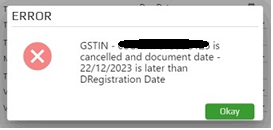
This article explains why the “GST NO Cancelled of Party” error appears during e‑invoice creation, how to check the GSTIN status on the GST portal, and what actions to take.
📋 Overview
The error occurs when the system reads a cancelled GST number (CNC) while the GST portal shows the number as active (ACT). Verifying the GSTIN status on the GST portal resolves the mismatch.
🔧 Steps / How‑to
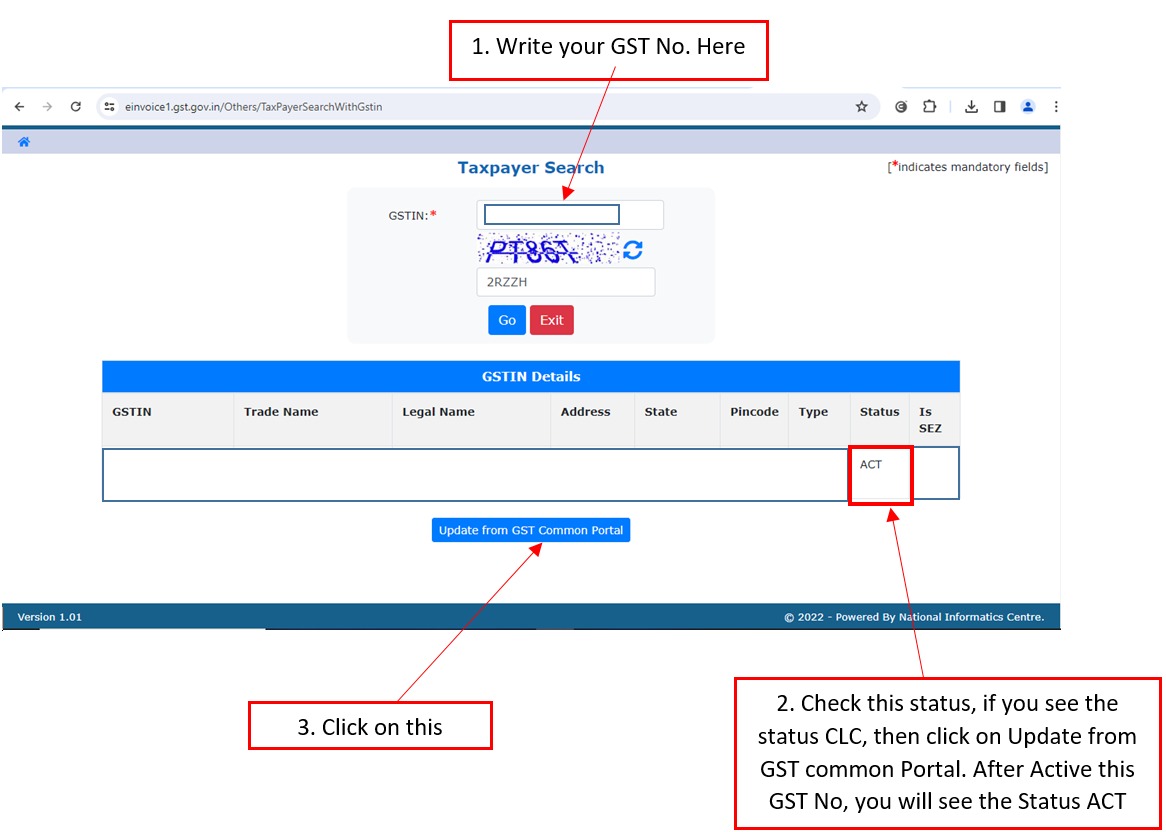
- Open the GST portal at einvoice1.gst.gov.in.
- Navigate to Search → Tax Payer / GSTIN.
- Enter the GST number you use for e‑invoicing and click Search.
- Check the status column:
- If the status shows CNC, click Update from GST Common Portal to reactivate the GSTIN.
- If the status shows ACT, the GSTIN is already active; the error may be due to cached data in ecount.
- After updating (if needed), retry creating the e‑invoice in ecount.
💡 Tip: Refresh the GSTIN master data in ecount after changing the status on the GST portal to ensure the latest status is used.
⚠️ Common issues / warnings
- Do not ignore a CNC status; the GSTIN must be active before issuing e‑invoices.
- If the status remains CNC after updating, contact the GST help desk.
✅ Summary
- Open the GST portal and search your GSTIN.
- Identify the status: CNC or ACT.
- If CNC, click “Update from GST Common Portal” to reactivate.
- Refresh ecount GSTIN data and retry the e‑invoice.